A food photo nutrition tracker sends your meal photo to an AI model that identifies the food, estimates the portion and returns calories and macros. It saves time, but estimates usually run low: a preliminary 2026 test of four apps found average undercounts of about 250–345 calories per meal, especially from fat. Use photos for speed, barcodes for packaged food, and always review the numbers before saving.
What is a food photo nutrition tracker?
A food photo nutrition tracker is an app that lets you log a meal by taking a picture of it instead of searching a food database and entering each item by hand. AI looks at the photo and returns an estimate of calories and nutrients, which you can then check, adjust and save to your daily log.
Most apps in this category now offer three ways to log, because no single method works for every meal:
- Photo: point your camera at the plate. Best for home-cooked and restaurant meals that have no label.
- Text description: type what you ate in a sentence ("two scrambled eggs, a slice of toast with butter"). Useful when you forgot to take a photo or when the important details, like the oil, aren't visible.
- Barcode: scan the code on packaged food to pull the label's nutrition data. The most reliable option when it's available.
The appeal is speed. Logging a mixed meal by hand can mean searching for five or six ingredients and guessing a weight for each. A photo turns that into a few seconds plus a quick review. The trade-off is precision, which the rest of this guide covers in detail.
How does AI count calories from a picture?
Apps differ and few publish exactly how their systems work, but the process breaks down into the same four jobs, whether they are done by separate models or by one.
1. Recognition: what is on the plate?
The first job is to identify the food: a salmon poke bowl, a cheeseburger with fries, a bowl of oatmeal with berries. Modern image models are quite good at this. In a 2024 study in Nutrients, the two best of seven apps identified food components correctly 97% and 92% of the time.
2. Portion estimation: how much is there?
Next, the system has to judge quantity. From a single flat photo, that means inferring volume from how much of the plate the food covers, how tall it looks and familiar size cues. Some apps add hardware help. Cal AI says it uses the phone's depth sensor for portion volume, and SnapCalorie uses LiDAR depth on iPhone Pro models. Most other apps rely on the image alone.
3. Nutrient estimation: what does that amount contain?
With a food and an amount, the system works out the energy and nutrients. Some designs look up values in a nutrition database. Others use a large multimodal model, such as Google Gemini or GPT-4o, that reads the image and produces the numbers directly in one step. Either way, the output is an estimate of calories, protein, carbs and fat, and sometimes fiber, sugar, sodium and saturated fat.
4. Review: you check and correct
The last step is yours. A good app shows the estimate before saving it and lets you change the portion and the numbers. This step is where most of the accuracy is won or lost, because you know things the camera can't: what the food was cooked in, whether you finished it, and what was hiding under the top layer.
If you are curious whether a general chatbot can do the same job, our guide on whether you can ChatGPT count calories from a photo compares the two approaches.
What can AI see in a food photo, and what can't it?
A photo captures the surface of a meal. That is enough for some details and not for others.
| Usually visible to AI | Hard or impossible to see |
|---|---|
| Which foods are present | Oil, butter or ghee used in cooking |
| Rough area each food covers | How deep a bowl is, or how tightly food is packed |
| Obvious toppings (cheese, avocado, nuts) | Dressings and sauces mixed in or poured underneath |
| Cooking style cues (fried, grilled, raw) | Sugar in drinks, cream in coffee, sweetened sauces |
| Packaging and barcodes, if in frame | Ingredients hidden in mixed dishes (stews, curries, casseroles) |
| Plate and utensils as rough size cues | Whether you ate all of it |
The right-hand column is where errors come from. It also explains why the research keeps finding the same pattern: photo apps miss energy that isn't on the surface. We look at each cause in why AI food photo apps underestimate calories.
How accurate is photo calorie tracking?
The short version: useful for consistent logging, not precise enough to trust on a single meal without a check. Here is what the main studies found. Our full write-up on how accurate are photo calorie apps has the details and caveats.
The 2026 NIH-linked test
Researchers at the NIH's National Institute of Diabetes and Digestive and Kidney Diseases ran 102 standardized meal photos through MyFitnessPal, Lose It!, Cal AI and Appediet. The meals came from an inpatient study where every ingredient was weighed to 0.1 g. Presented at NUTRITION 2026 in July, the results showed all four apps underestimated energy by about 250 to 345 calories per meal on average and fat by about 30 g. Carbohydrate estimates were more consistent, and high-fat ketogenic meals did worse.
This is a conference abstract, not a peer-reviewed paper, and the release calls the findings preliminary. Per-app results were not released.
Peer-reviewed research
- The 2024 Nutrients study found AI apps recognized foods well but estimated energy inaccurately, with Asian mixed dishes underestimated by up to 76%.
- A 2023 systematic review of 52 studies (Shonkoff et al.) found mean calorie errors from 0.10% to 38.3%, better for simple foods, and AI roughly comparable to human estimators.
- A 2025 study of general chatbots (Fridolfsson et al.) found energy errors of 35.8% for GPT-4o and Claude 3.5 Sonnet and 64.2% for Gemini 1.5 Pro, with underestimation growing as portions got larger.
Manual logging isn't the gold standard either
It's tempting to read those numbers and conclude you should log by hand. But self-reported intake has its own well-documented problem. A 2025 Nature Food analysis of national survey data using doubly labelled water flagged misreporting in more than half of reports. A classic 1992 NEJM study found one small group under-reported intake by 47% on average. We weigh the trade-offs in photo food logging vs manual calorie counting.
What about the accuracy numbers apps advertise?
Treat them with caution. Cal AI's FAQ says it is "about 80% accurate" without defining what that means, and SnapCalorie quotes calorie error ranges from its own testing. These figures use different methods and test meals, so they can't be compared with each other or with the NIH results. Our page on the most accurate AI calorie tracker explains how to read these claims.
How do you get better numbers from a food photo?
You can't make a photo estimate exact, but you can remove most of the predictable error. Work through these in order.
Take a better photo
- Shoot from a slight angle rather than straight down, so the height of the food shows.
- Use good light. A dim photo hides texture and edges.
- Keep the whole plate, bowl or glass in frame, with nothing cropped off.
- Spread out food that is piled up, if you can, so less is hidden.
- Photograph before you eat, not halfway through.
Our guide on how to take food photos for accurate calorie tracking covers angle, light, scale and hidden fats with examples.
Correct the portion
Compare the app's portion estimate with what you actually ate. If you had a second helping, scale it up; if you left a third, scale it down. You don't need a kitchen scale to do this well. Learn to estimate portion sizes without a scale using your hand and everyday objects.
Add the fat the camera missed
Since fat was the most undercounted nutrient in the NIH test, make it your first check. If a dish was fried, sautéed, buttered or dressed, assume the estimate is low and raise the fat and calories. Restaurant meals are the hardest case, because you rarely know how they were cooked, so it helps to have a plan when you count calories at restaurants.
Log what isn't in the picture
Drinks, side sauces, the cream in your coffee and anything you ate while cooking are invisible to a plate photo. Log them separately.
A worked example
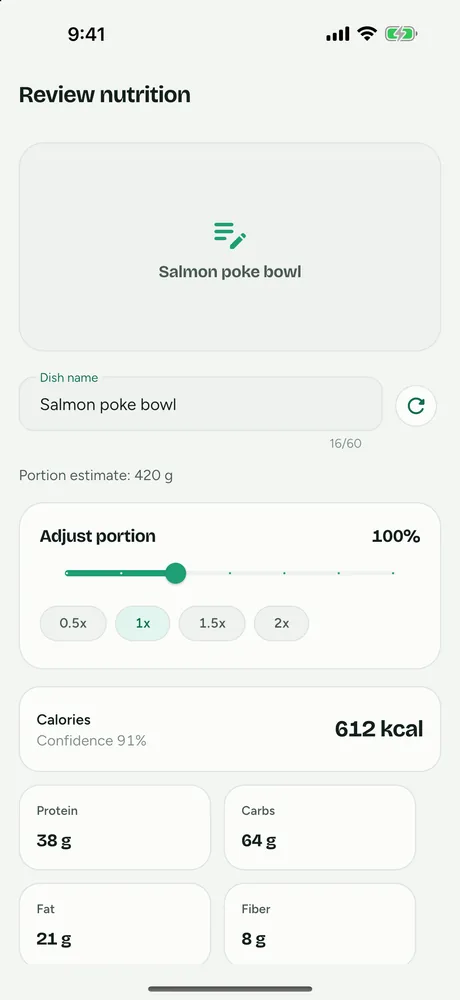
Say an app looks at a poke bowl and returns 612 kcal for a portion it judges at about 420 g. Three quick checks change that number:
- Portion: your bowl was noticeably bigger than a standard one, so you set the portion to 1.5×. The estimate becomes about 920 kcal.
- Hidden fat: it came with a creamy sauce mixed in that the photo didn't show clearly. You raise fat and calories to account for it.
- Extras: you also had a sweetened drink, which wasn't in the photo. You log it as a separate entry.
None of those corrections needs a scale, and the portion change alone moved the total by about 300 kcal.
Watch the trend
Even an imperfect log is useful if it is consistent. If you know your entries tend to run low, the weekly trend still shows whether you are eating more or less than before.
What are the most common photo logging mistakes?
Most bad numbers come from a handful of habits, not from the AI itself.
- Saving without reviewing. The estimate is a first draft. Accepting it as-is builds the known undercount straight into your log.
- Photographing packaged food. If it has a barcode, scan it. A label beats a visual guess.
- Taking the photo late. A half-eaten plate is harder to read, and it is easy to forget what was on it.
- Forgetting drinks and extras. Coffee with milk, juice, a side of dressing or bread from the basket rarely make it into the meal photo.
- Trusting the default portion. The app has to assume a serving size. If yours was bigger or smaller, say so.
- Judging by one day. Individual estimates vary. Weekly averages are far more informative than any single meal.
Photo, text, barcode or manual: which should you use?
Each logging method has a situation where it is the best choice. A good tracker lets you switch between them meal by meal.
| Method | Best for | Weak spot |
|---|---|---|
| Barcode scan | Packaged food with a label: snacks, yogurt, cereal, drinks | Only as good as the product database; doesn't work for unpackaged food |
| Photo | Plated meals, restaurant food, anything without a label | Hidden fats, mixed dishes, portion depth |
| Text description | Meals you forgot to photograph; meals where you know the details (e.g. "cooked in a tablespoon of olive oil") | Depends on how specific you are; vague descriptions give generic estimates |
| Manual database entry | Recipes you cook often and have weighed | Slow, and self-reported logs still tend to run low |
A practical routine for many people: scan barcodes whenever there is one, take a photo for plated meals, and switch to a description when a meal has an important detail the camera can't see. If typing suits you, you can log meals by describing them in a sentence.
Barcode scanning deserves a special mention because it is the most reliable method and some large apps now charge for it. MyFitnessPal moved its barcode scanner to Premium in 2022, and Lose It! lists its barcode scanner as a Premium feature in its current App Store listing. If that matters to you, look for a free barcode scanner calorie counter.
How do you choose a food photo calorie app?
We make FitFoodie, so weigh our view accordingly. These are the questions we would ask of any app, including ours.
A checklist
- Can you edit the estimate before it is saved? Since every photo estimate needs a check, the review screen matters more than the camera. Look for portion adjustment and editable numbers.
- Which nutrients does it track? Calories and the three macros are standard. Fiber, sugar, sodium and saturated fat are useful if you watch them. An AI macro tracker should show more than calories.
- Does it offer more than one way to log? Photo, barcode and text cover nearly every meal between them.
- What is free and what is paid? Many apps put AI photo analysis behind a subscription, and some also charge for barcode scanning. Check before you build a habit.
- How clear is the paywall? Read what you will be billed and when. Apple briefly pulled Cal AI from the App Store in April 2026 over billing and in-app purchase violations before it was reinstated, which shows how much paywall design can vary.
- Where do your photos go? Meal photos are sent to a server for analysis, often to a third-party AI provider. Read the privacy policy to see whether photos are kept, who processes them and how to delete them.
- Can you get your data out? An export to CSV or similar means your history isn't locked in.
- Does it run on your phone? Check the app is available on your platform before comparing anything else. Android users can start with our list of the best AI calorie counter app for Android.
How the main photo apps compare
Features below are from each app's official listing or site as of October 2026. Pricing changes often, so check the store listing before you subscribe.
| App | AI photo logging | Barcode | Other notes |
|---|---|---|---|
| MyFitnessPal | Meal Scan, Premium | Premium (since 2022) | Also offers voice logging in Premium. Acquired Cal AI (announced March 2026). |
| Cal AI | Core feature; results need a subscription | Yes | Uses the phone's depth sensor for portions; text logging; 3-day trial |
| Lose It! | Photo logging (formerly Snap It), Premium | Premium | AI voice logging in Premium |
| SnapCalorie | Core feature, LiDAR depth on iPhone Pro | Not confirmed | Voice and text logging; free core tier plus Premium |
| Cronometer | Photo Logging, Gold only | Yes | Added photo logging in 2025 |
| MacroFactor | Photo and photo-with-text | Yes | Also "Describe" text logging; subscription-only app |
| FitFoodie | Premium | Free | Text logging (Premium); single photo, no depth sensor |
Two things other apps do that FitFoodie doesn't: Cal AI and SnapCalorie use depth sensing to help with portion size, and several apps offer voice logging. For a needs-based roundup, see our roundup of the best AI calorie tracker apps.
If you already use one of these apps and want to compare directly, we have head-to-head pages:
- Cal AI alternative: FitFoodie vs Cal AI, feature by feature.
- SnapCalorie alternative: depth sensing vs a single-photo approach.
- MyFitnessPal alternative with AI photo logging and a free barcode scanner.
- Lose It! Snap It vs Cal AI vs FitFoodie: which photo logger fits you.
Who is photo nutrition tracking a good fit for?
Photo tracking suits people who want a reasonable picture of their eating without spending several minutes on every meal. If manual logging has felt like too much work to keep up, a faster method you actually use can be more useful than a precise one you abandon.
It is a weaker fit when precise numbers matter. The NIH test found the largest errors on high-fat ketogenic meals, and lower-calorie meals were harder for some apps. If you follow a medically supervised diet or need exact intake figures for a health condition, weigh your food and work with a registered dietitian or your doctor. App estimates are for information, not medical advice.
And if tracking every meal starts to feel stressful rather than helpful, it is fine to step back. A food log is a tool, not a test.
How does FitFoodie do it?
FitFoodie is our AI calorie counter from a photo, for iPhone (iOS 15+) and Android. Here is how it handles the steps above.
- Three ways to log. Snap a photo, scan a barcode, or describe the meal in a sentence.
- Google Gemini does the estimate. From one photo, it returns a dish name, a portion estimate, a list of ingredient names and one set of totals for the whole dish: calories, protein, carbs, fat, fiber, sugar, sodium and saturated fat. It does not give a separate breakdown per item.
- Barcode first. If your photo shows a product barcode, FitFoodie uses the label data instead of guessing.
- You review before saving. Scale the portion from 0.5× to 2×, tap any of the eight values to change it, rename the dish, and set a meal tag (Breakfast, Lunch, Dinner, Snack or Treat). You can add or remove ingredient names, but that doesn't recalculate the numbers, so adjust the values yourself or use "recalculate from name" (Premium) after renaming the dish.
- Free barcode scanning. The scanner checks Open Food Facts, USDA FoodData Central and FatSecret in turn.
- Free tracking around it. Water, weight with a 7-day trend line, history with edit, delete and undo, one-tap re-adding of a past meal, and a weekly view of days on target.
AI analysis and barcode lookups need an internet connection. Water logging and saving entries work offline and sync later.
AI photo and text analysis are part of FitFoodie Premium. FitFoodie wasn't part of the NIH test and we don't publish an accuracy figure for it; its results are estimates to check. It doesn't sync with Apple Health or Google Fit, and it has no saved-meal library beyond re-adding past entries.
Frequently asked questions
Can AI count calories from a picture?
It can estimate them. AI is good at recognizing which foods are on a plate and much weaker at judging amounts and hidden fats. A preliminary independent test (NUTRITION 2026) found four popular apps undercounted meals by about 250–345 calories on average, so check and correct each estimate before you save it.
What happens to my meal photos in FitFoodie?
Your photo is uploaded to your account's private storage, where only you can read it, and sent to Google Gemini for analysis. It stays with the entry. Deleting a single entry does not delete its photo, so Undo can restore it. Deleting your account from Settings removes all your photos and data. Details are in our privacy policy.
Can I export my food log?
Yes. In FitFoodie, Settings → Export data gives you your entries as a CSV file and your profile as JSON. That export is free. There is no PDF export.
What is free and what is Premium in FitFoodie?
AI photo and text analysis are part of Premium, as are Insights. Barcode scanning, water tracking, weight tracking, history, editing, re-adding a past meal, reminders and the daily dashboard are free.
Does FitFoodie sync with Apple Health or Google Fit?
No. FitFoodie does not connect to Apple Health, Google Fit, Health Connect or wearables. Weight is logged inside the app.