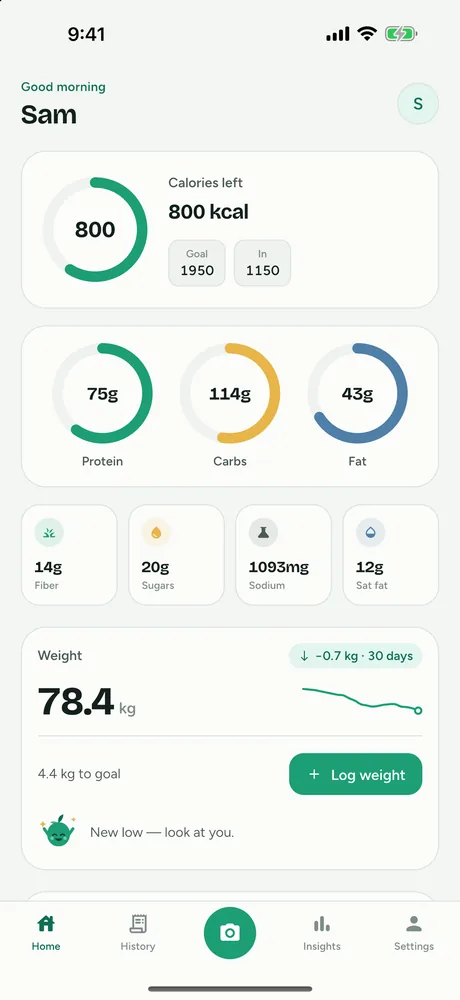
FitFoodie is a macro tracker that fills in the numbers for you: snap a photo, scan a barcode or describe a meal, and each entry records calories, protein, carbs, fat, fiber, sugars, sodium and saturated fat. Your home screen then shows how today compares with targets the app works out from your profile.
What the macro tracker records
Every entry has the same eight fields; barcode entries fill the last four when the database has them.
| Nutrient | Unit | Daily reference in FitFoodie |
|---|---|---|
| Calories | kcal | Personal target |
| Protein | g | Personal target |
| Carbs | g | Personal target |
| Fat | g | Personal target |
| Fiber | g | 14 g per 1,000 kcal of your calorie target |
| Sugars (total) | g | Fixed limit: 50 g |
| Sodium | mg | Fixed limit: 2,300 mg |
| Saturated fat | g | Fixed limit: 20 g |
The sugar value is total sugars, not added sugar, so fruit and milk count toward it. FitFoodie does not track vitamins, minerals or cholesterol. If you mainly want an app to track sodium, fiber and sugar intake alongside your macros, those four extra values are always on, with no setup.
How logging works
- Log a meal one of three ways. Take one photo (Premium), describe your meal in text (Premium), or scan a product barcode (free). You can also re-add a past meal from History in one tap, for free.
- Review the numbers. The AI, or the barcode database, fills in all eight values. Scale the portion from 0.5× to 2×, and tap any number to change it.
- Tag and save. Pick Breakfast, Lunch, Dinner, Snack or Treat. The entry joins today's totals.
- Watch the dashboard. The home screen shows calories left, protein, carbs and fat rings, and tiles for fiber, sugars, sodium and saturated fat. A free weekly card shows 7 days of calories against your goal, days on target, and calorie and protein streaks.
Photo and text results are estimates of a typical or pictured serving, so portion size matters more than anything else. If you're unsure how much you ate, our guide on how to estimate portion sizes without a scale helps you pick the right multiplier.
How your targets are calculated
You don't type in macro goals. FitFoodie builds them from the details you give during onboarding: sex, height, weight, birth date, activity level and goal (lose, maintain, gain or build muscle).
- Energy at rest uses the Mifflin–St Jeor equation: 10 × weight in kg + 6.25 × height in cm − 5 × age, plus 5 for men or minus 161 for women (the midpoint is used if you choose "other").
- Activity multiplies that by 1.2 (sedentary), 1.375 (light), 1.55 (moderate) or 1.725 (active).
- Goal adjusts it: ×0.85 to lose, ×1.15 to gain, ×1.10 to build muscle. The target never drops below your resting energy, or below 1,200 kcal (female or other) or 1,500 kcal (male).
- Protein is set per kilogram of body weight: 1.6 g to maintain, 1.8 g to lose, 2.0 g to gain or build muscle.
- Fat is 30% of calories, and carbs take the remaining energy, with neither falling below 20%.
- Fiber is 14 g per 1,000 kcal.
Sugar, sodium and saturated fat use the same fixed limits for everyone (50 g, 2,300 mg and 20 g). You can't change them.
Targets follow your weigh-ins
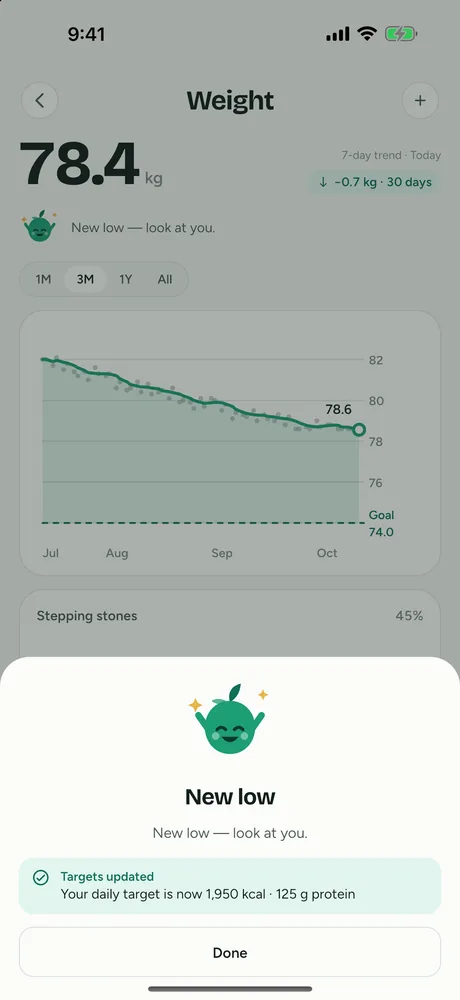
Weight tracking is free. When you log a new weigh-in that is your latest one, FitFoodie updates your profile weight and recalculates your calorie and protein targets from it. You don't have to revisit settings as your weight changes.
Seeing your macros over time
Day to day, the home screen is enough: calories left, the three macro rings and the four nutrient tiles all update as soon as you save an entry. The free weekly card adds a 7-day view of calories against your goal, how many days you were on target, and streaks for calories and protein.
Premium Insights go further, with ranges from today up to a full year. They show your energy trend against target, average protein, carbs, fat and fiber against their targets, the energy split between macros, days on target, meal rhythm, your top meals, and your sugar, sodium and saturated fat against their fixed limits. If you want your raw numbers elsewhere, Settings exports your entries as CSV (with all eight nutrients per entry) and your profile as JSON, for free.
Honest limits
- No custom goals or limits. If a coach or dietitian has given you specific macro numbers, FitFoodie can't store them as your targets.
- Estimates per dish, not per item. A photo or text result gives one set of totals for the meal, not a breakdown per ingredient. Editing the ingredient list does not change the numbers.
- AI numbers are estimates. Hidden oils and sauces are the usual source of error. Check the fat figure on rich dishes and edit it when you know better.
- No manual entry from scratch. Every entry starts from a photo, text, barcode or past meal. You can't add a food by typing its nutrition into a blank form.
- No Health app sync. Nothing is shared with Apple Health, Google Fit or Health Connect.
Free vs Premium
| Feature | Tier |
|---|---|
| Daily dashboard, targets, weekly days-on-target and streaks | Free |
| Barcode scanning, water and weight tracking | Free |
| Edit any entry, re-add a past meal, export entries from Settings | Free |
| AI estimates from a photo or a text description | Premium |
| Insights from today up to a year: energy trend, macro averages, days on target, meal rhythm, top meals, and sugar/sodium/sat-fat limits | Premium |
To see how the AI side works in practice, read the calorie counter by photo page, or the broader food photo nutrition tracker guide.
FitFoodie's targets come from standard equations and its nutrition values are estimates for information. Talk to a doctor or registered dietitian about what is right for you.
Frequently asked questions
Which nutrients does FitFoodie track?
Eight: calories, protein, carbs, fat, fiber, sugars, sodium and saturated fat. It does not track vitamins, minerals or cholesterol.
Can I set my own macro goals?
No. FitFoodie calculates your calorie and macro targets from your profile using the Mifflin–St Jeor equation, and recalculates them when you log a new weigh-in. There is no screen for typing in custom goals.
Does it track added sugar?
No. The sugar figure is total sugars for the meal, from the AI estimate or the product label data. FitFoodie does not separate added sugar from natural sugar.
Is macro tracking free?
The daily dashboard, targets, weekly view and barcode logging are free. AI estimates from a photo or a text description are Premium, as are the longer-range Insights charts. The yearly plan starts with a 7-day free trial for new subscribers.