FitFoodie is a calorie counter by photo for iPhone and Android: you snap a meal, the AI suggests a dish name, a portion and eight nutrient values, and you correct anything that looks off before it goes into your log. The app is free to download. AI photo analysis is a Premium feature, and we say that up front because many searches for a "free AI calorie counter app" end at a paywall anyway.
What the photo calorie counter does
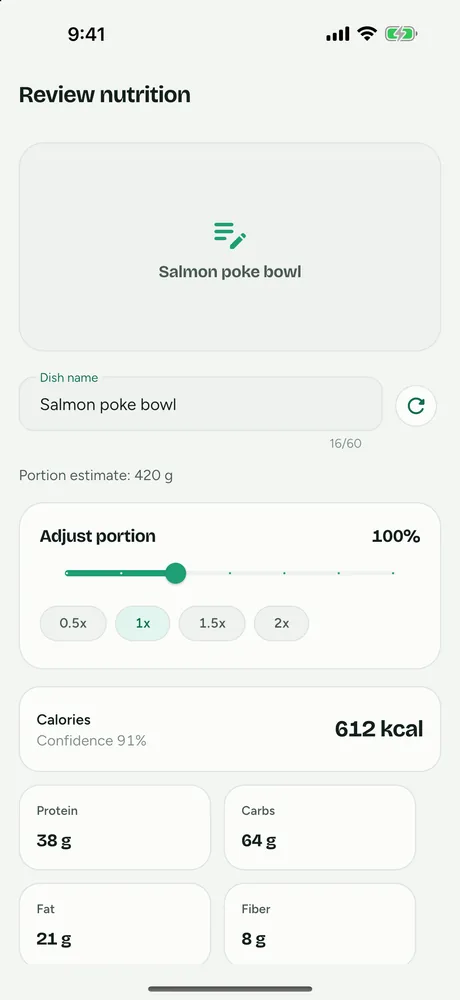
You point the camera at your plate, or pick a photo from your gallery, and FitFoodie returns a review screen with:
- a dish name and a portion estimate (for example in grams, cups or pieces)
- calories, protein, carbs and fat
- fiber, sugars, sodium and saturated fat
- a list of the ingredients the AI thinks it sees
The analysis runs on Google Gemini through FitFoodie's server, so your phone only uploads a compressed copy of the photo. Dish names and ingredients come back in your app language: English, Spanish, German, French or Arabic.
If you want the background first, read our guide to how AI counts calories from a picture.
How it works, step by step
- Open the camera. Tap the camera button or "Snap a meal" on the home screen. FitFoodie checks your Premium status before the camera opens, so you are not asked to shoot a photo you cannot analyse.
- Take or choose one photo. The in-app camera uses the back lens and has a flash toggle (off, auto, on). You can also pick an existing photo from your gallery.
- Barcode check. If the photo shows a product barcode that a food database knows, FitFoodie uses the label data instead of guessing. You can still tap "Not this product? Analyze the photo with AI" if the match is wrong.
- AI estimate. Otherwise the compressed photo is uploaded and analysed. The model is asked to keep values conservative and to report how confident it is.
- Review and adjust. Change the portion with a slider from 0.5× to 2× (or the 0.5, 1, 1.5 and 2× chips), tap any of the eight numbers to edit it, rename the dish, add or remove ingredient chips, and pick a meal tag: Breakfast, Lunch, Dinner, Snack or Treat.
- Save. The entry lands in today's totals on the home dashboard, grouped under its meal tag. You can open it later from History to edit or delete it, with an Undo.
What you get for each meal
Every saved entry has the same eight fields, whether it came from a photo, a barcode or a text description. Photo and text analysis fill all eight; barcode entries fill the last four when the database has them:
| Nutrient | Unit |
|---|---|
| Calories | kcal |
| Protein, carbs, fat | g |
| Fiber, sugars, saturated fat | g |
| Sodium | mg |
These roll up into the calorie ring, macro rings and fiber/sugar/sodium/sat-fat tiles on the home screen, measured against targets the app calculates from your profile. The AI macro tracker page explains how those targets are set. FitFoodie does not track vitamins or minerals.
How accurate is it?
A photo estimate is an estimate. Cooking oil, butter, dressings and the depth of a bowl are hard for any camera to see, and a preliminary NIH study presented at NUTRITION 2026 found four popular photo apps underestimated meals by roughly 250–345 calories and about 30 g of fat on average. We have not had FitFoodie independently tested, so we do not publish an accuracy percentage. For the research, see how accurate photo calorie estimates are.
What you can do about it:
- Take a clear, well-lit photo from slightly above, with the whole plate in frame. Our food photo tips cover this in more detail.
- Use the portion slider when you ate more or less than pictured.
- Edit the fat or calorie number when you know a dish was cooked in a lot of oil.
- For packaged food, use the free barcode scanner, which reads label data from food databases instead of estimating.
Honest limits
- Per dish, not per item. You get one set of totals for the whole photo, not separate calories for the rice, the salmon and the sauce.
- Editing ingredients does not recalculate numbers. Adding or removing an ingredient chip only changes the list. To change the numbers, edit them directly or use "recalculate from name" (Premium) after renaming the dish.
- One photo per meal. There is no multi-photo or multi-angle capture.
- Needs a connection. Analysis runs on a server, so it does not work offline.
- Not unlimited. Premium analyses are capped at 10 per minute and 150 per day per user, which is well above normal meal logging.
- Photos are stored. Your meal photo is kept with the entry in your account until you delete your account. It is sent to Google Gemini for analysis.
- No Health app sync. FitFoodie does not connect to Apple Health, Google Fit or Health Connect.
Free vs Premium
| Feature | Tier |
|---|---|
| AI photo analysis | Premium |
| AI text description ("Describe") | Premium |
| Premium Insights (trends up to a year) | Premium |
| Barcode scanning | Free |
| Water and weight tracking | Free |
| History, editing, delete with Undo, one-tap re-add of a past meal | Free |
| Daily dashboard and weekly days-on-target view | Free |
If you only want a free way to log packaged food, the barcode scanner does that without a subscription. If you mostly eat home-cooked or restaurant meals, photo logging is where Premium earns its keep. When a photo is hard to take, you can also log meals by describing them in a sentence.
FitFoodie's nutrition values are AI estimates for information. They are not a substitute for advice from a doctor or registered dietitian.
Frequently asked questions
Is FitFoodie a free AI calorie counter app?
The app is free to download, and barcode scanning, water logging, weight tracking, history and re-adding past meals are free. AI photo analysis and AI text analysis are part of Premium, so a free account cannot run a photo estimate. The yearly plan starts with a 7-day free trial for new subscribers.
Does it count calories for each item on my plate separately?
No. The AI returns one dish name, one portion estimate and one set of nutrient totals for the whole photo, plus a list of ingredient names. It does not give separate calories per item.
How accurate is a calorie count from a photo?
It is an estimate. Hidden oils, sauces and portion depth are hard to see in any photo. FitFoodie does not publish an accuracy figure; instead you can adjust the portion and edit every number before you save.
Can I take more than one photo of a meal?
No. Each analysis uses one photo, taken with the in-app camera or picked from your gallery.
Does photo analysis work offline?
No. The photo is analysed by a Cloud Function that calls Google Gemini, so you need a connection. Water logs and saved entries are queued offline.