AI photo apps underestimate calories because the biggest calorie sources are often invisible or ambiguous in a photo: cooking oil, butter, dressings and sauces, plus food depth that a flat image can't measure. Mixed dishes and less-represented cuisines make it worse. A preliminary 2026 NIH study found four popular apps undercounted by about 250–345 kcal per meal, especially from fat. Fix it by adding what the camera can't see and correcting the numbers before you save.
Do AI photo calorie apps really undercount?
The best recent evidence says yes, on average. In a study presented at NUTRITION 2026, NIH researchers ran 102 standardized meal photos through MyFitnessPal, Lose It!, Cal AI and Appediet. Every ingredient had been weighed to 0.1 g in a metabolic kitchen. All four apps underestimated energy by roughly 250–345 kcal per meal and fat by about 30 g. Carbohydrate estimates were more consistent than fat or protein.
Two caveats matter. This is a conference abstract, not yet a peer-reviewed paper, and per-app numbers were not released. Older work also shows wide errors: a 2023 systematic review of 52 studies in Annals of Medicine found mean relative calorie errors from 0.10% to 38.3%, with better results for simple foods.
Aaron Hengist, one of the NIH researchers, summed it up plainly: "These apps tend to underestimate calories, especially from fats." The rest of this page explains why fat in particular goes missing. For the full study breakdown, see how accurate photo calorie apps are.
Why can't the camera see oil, butter and dressing?
Because most added fat leaves no visual trace. Oil soaks into roasted vegetables, rice and fried food. Butter melts into mashed potatoes and sauces. A salad looks the same whether it has a light drizzle or a heavy pour of dressing. The model has to guess the amount from what the dish usually contains, and it has nothing in the image to push that guess up.
Fat was undercounted by about 30 g per meal on average. Their exploratory follow-up with over 200 ketogenic-diet meals, which are high in fat by design, showed even worse accuracy. That is the pattern you would expect if hidden fat is the main blind spot.
Common places calories hide in a photo:
- Cooking fat: oil or butter in the pan, absorbed into the food.
- Sauces and dressings: pooled under food, mixed in, or served on the side out of frame.
- Toppings that blend in: cheese melted into a dish, nuts or seeds scattered through a salad, mayonnaise inside a sandwich.
- Drinks: a latte, juice or smoothie next to the plate may be skipped or treated as something lighter.
- Preparation: grilled and pan-fried chicken can look alike but differ in added fat.
Why is portion size so hard to judge from a photo?
A photo is flat. It shows the area food covers, not how tall the pile is or how deep the bowl goes. A wide shallow plate of pasta and a deep bowl of the same pasta can look similar from above, yet hold very different amounts. Without a known object for scale, the model also can't be sure whether it's looking at a side plate or a platter.
Portion error grows with meal size. In a peer-reviewed 2025 test of general AI models on 52 weighed meals, Fridolfsson et al. found that all three models underestimated more as portions got larger. In other words, the bigger the meal, the more the estimate tends to fall short.
Some apps try to measure depth directly. Cal AI says it uses the phone's depth sensor for portion volume, and SnapCalorie uses LiDAR on iPhone Pro models, built on research from the Nutrition5k dataset. That is a real attempt at the depth problem. Depth sensing still can't see oil, though, and Cal AI was one of the four apps that undercounted in the NIH test.
Why do mixed dishes and some cuisines do worse?
Recognizing a food and estimating its energy are two different jobs, and AI is much better at the first. A 2024 study in Nutrients (Li et al.) tested seven AI image apps. The best ones identified food components well: MyFitnessPal at 97% and Fastic at 92%. Yet the authors concluded that "automatic energy estimations from AI-enabled food image recognition were inaccurate."
Mixed dishes were the weak spot. For Asian mixed dishes, energy was underestimated by up to 76%. Stir-fries, curries, noodle soups and rice dishes combine many ingredients, cooking fats and sauces in one bowl, so there is no single "food" to look up. The model has to guess the recipe as well as the amount.
The same study found that manual-logging apps also drifted by cuisine: they overestimated Western diets and underestimated Asian ones. That points to the underlying nutrition data and recipe assumptions, not only the camera. If you mostly eat dishes that are less common in the training data or databases an app relies on, expect wider errors. We compare those trade-offs in logging by photo vs manually.
How do you correct an estimate that looks low?
You don't need to give up photo logging. You need to add what the camera can't know. These steps work in most apps:
- Take a better photo. Fit the whole plate in frame, use good light, and include sides and drinks. Our guide on how to photograph food for better estimates covers angle and scale.
- Say what was added. If the app lets you describe the meal, name the cooking fat and sauce: "chicken stir-fry with rice, cooked in two tablespoons of oil, with peanut sauce" gives the model something to work with.
- Check fat first. If the dish was fried, dressed or buttery and the fat number looks modest, raise it, and raise calories with it.
- Fix the portion. If you ate more or less than shown, scale it rather than leaving the default.
- Use the label when there is one. Packaged food is better logged from its barcode than estimated from a picture.
- Weigh now and then. Weighing a few typical meals shows you which way your photo estimates usually miss.
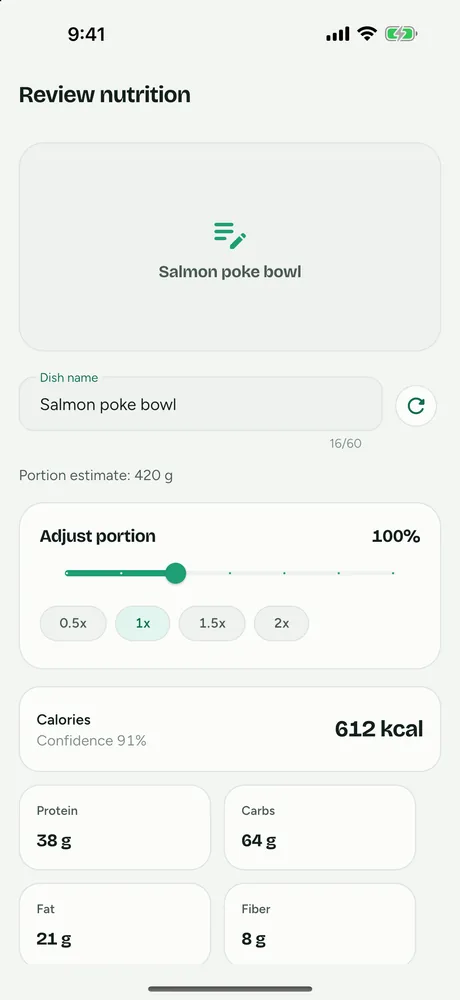
Here is how those steps map to FitFoodie. The review screen shows the AI's estimate before anything is saved. You can scale the portion from 0.5× to 2× and tap any of the eight values (calories, protein, carbs, fat, fiber, sugars, sodium, saturated fat) to change it. You can also edit the dish name, for example to "pad thai, extra oil", and tap recalculate to re-run the estimate from that name.
One honest limit: adding or removing ingredient chips does not change the numbers. To account for a hidden fat, edit the values or recalculate from the name. You can also skip the photo and describe the meal in a sentence instead. If a photo shows a product barcode the databases know, FitFoodie uses the label data instead of guessing. AI photo and text analysis, including recalculate, are part of Premium. Barcode scanning is free.
When can you trust a photo estimate?
Photo estimates are most reliable when what you see is most of what you eat: a piece of fruit, plain grilled fish with steamed vegetables, a simple sandwich. They are least reliable for fried food, creamy or oily sauces, dressed salads, curries, stir-fries, large portions and anything layered or hidden.
A useful habit is to treat a photo estimate of a rich, mixed or restaurant dish as a starting point that probably runs low, and adjust it before saving. Over weeks, consistent logging with sensible corrections tells you more than a perfect log you don't keep up.
General chatbots face the same problems, and the research on them is mixed. See can ChatGPT count calories from a photo. For the bigger picture of recognition, portion estimation and nutrient lookup, read our guide to how AI counts calories from a picture.
Nutrition values from any app are estimates for information, not medical advice. If you're managing a health condition, talk to a dietitian or doctor.
Frequently asked questions
Do all AI photo calorie apps undercount?
Not every meal, and not by the same amount. But in a preliminary NIH study presented at NUTRITION 2026, all four apps tested (MyFitnessPal, Lose It!, Cal AI and Appediet) underestimated energy by roughly 250–345 calories per meal on average, especially from fat. Undercounting is the common direction.
Does a better photo fix the problem?
It helps with recognition and portion size: shoot from above and at an angle, in good light, with the whole plate in frame. It cannot show oil absorbed into food or butter melted into a sauce. For those, add the information yourself by describing the meal or editing the numbers.
Is FitFoodie immune to this?
No. FitFoodie uses Google Gemini to estimate a whole dish from one photo, and it faces the same limits as any photo app. It was not part of the NIH test and we do not publish an accuracy figure. What it gives you is a review step where you can change the portion and all eight nutrient values before saving.