Take one photo per dish, from about 45 degrees, in even light, with the whole plate in the frame. Leave sauces, dressings and spreads visible, and keep a fork or your hand nearby for scale. Use a barcode for anything packaged. Then treat the result as a draft: check the portion, raise fat if the food was cooked in oil or butter, and save.
Why does the photo matter so much?
A photo calorie app has to do two hard things from one flat image: work out what the food is, and work out how much of it there is. The second part is where most of the error comes from. A camera cannot weigh anything, and it cannot see oil that has soaked into rice or butter melted into a sauce.
Independent testing backs this up. In a preliminary NIH study presented at NUTRITION 2026, four photo-based apps (MyFitnessPal, Lose It!, Cal AI and Appediet) underestimated meals by roughly 250–345 calories and about 30 g of fat on average, according to the American Society for Nutrition's release. The findings are not yet peer-reviewed, but the direction matches what you would expect: fat and portion size are the weak spots.
You cannot fix a model, but you can hand it a better picture and then correct what it gets wrong. That is what this guide covers. For the bigger picture on how this kind of food photo nutrition tracker works, start with our main guide.
What angle should you shoot from?
For most plates and bowls, hold the phone at roughly 45 degrees, about an arm's length away. That angle shows the surface of the food and some of its height, which is the closest a single photo gets to showing volume.
- Flat foods (pizza, toast, a thin omelette): shoot from directly above. Height adds little, and the top-down view shows the full area.
- Tall or layered foods (burgers, sandwiches, layered cake, a glass of smoothie): shoot lower, closer to side-on, so the stack is visible.
- Deep bowls (soup, ramen, cereal): 45 degrees or a little steeper, so you see both the rim and how full the bowl is.
Avoid extreme close-ups. A dramatic macro shot of a burger tells the AI a lot about texture and almost nothing about size.
How much does lighting matter?
A lot more than people expect. Dim or yellow light flattens colors, so a creamy sauce and a cheese sauce can look the same, and dark shadows can hide half a plate. Good light helps the AI identify the food correctly, which is the first step to a sensible estimate.
- Daylight from a window is best. Turn the plate so the light falls across the food rather than behind it.
- Avoid strong backlight, which turns the plate into a silhouette.
- Watch for glare on glossy sauces and plates; move the phone a little until the bright spot disappears.
- In a dark room, flash is better than a blurry, grainy shot. FitFoodie's in-app camera has an off / auto / on flash toggle.
Hold still for a moment before tapping. A sharp photo in average light beats a blurry one in great light.
Should the whole plate be in the frame?
Yes. Fit the whole plate or bowl in the frame with a small margin around the edge. If the rim is cut off, the AI loses its best clue about how big the serving is, and anything at the edge of the plate (a dollop of mayo, a side of chips) may not be counted at all.
Fill most of the frame with the food, though. A tiny plate in the middle of a wide table shot gives the model fewer pixels to work with. FitFoodie resizes photos before upload, so detail that is only a few pixels wide in the original is easy to lose.
One dish or the whole table?
Take one photo per dish. FitFoodie analyzes one photo per meal entry and returns a single dish name, a single portion estimate and one set of totals. It does not split a photo into separate items with their own calories.
That means a photo of your main plate, a side salad and a dessert together comes back as one combined estimate. You can still adjust it, but you cannot see which part is off. Three photos give you three entries, each with its own portion to check. This matters most for meals with very different foods: a big salad and a slice of cake have nothing in common, calorie-wise, and are easier to judge separately.
When foods share a plate (rice, curry and vegetables), one photo is fine. That is one dish.
How do you show hidden fats and sauces?
Fat was the most undercounted nutrient in the NIH test, and they are often invisible. A tablespoon of olive oil is about 119 calories according to USDA FoodData Central, and a pan-fried dish can easily carry more than that without looking oily.
- Photograph before you mix. Take the picture before you stir the dressing into the salad or the sauce into the pasta.
- Keep sides in view. Put dipping sauces, butter pats, dressing cups and mayo on the plate or right next to it, inside the frame.
- Do not hide toppings. Cheese under the lettuce or a fried egg under the rice will not be seen.
- Know what the photo cannot show. Oil a dish was cooked in, butter melted into mash, or syrup soaked into a cake. When you know it is there, raise the fat and calories on the review screen.
Our guide on why AI photo calorie apps underestimate goes deeper into hidden oils and portion depth.
How do you give the AI a sense of scale?
A plate can be a 20 cm side plate or a 30 cm platter, and in a photo they can look identical. Put something of known size in the frame:
- A standard fork, knife or spoon beside the plate.
- Your hand resting next to the dish.
- A can or bottle on the table.
This is a visual cue, not a measurement: it gives the AI something to compare the plate against, but it cannot weigh the food. Your own judgment still matters most. If you want to sharpen it, our guide on how to estimate portion sizes without a scale covers the hand method and household objects.
When is a barcode better than a photo?
Any time the food is packaged. A protein bar, a yogurt pot or a bag of crisps has a label with real numbers, and a barcode lookup returns those numbers instead of an estimate.
- FitFoodie's barcode scanner is free. It checks Open Food Facts, USDA FoodData Central and FatSecret in turn, and you can set the amount in grams or ml.
- If a meal photo happens to show a product barcode that a database knows, FitFoodie uses the label data instead of guessing.
- If the product is not found, the app says so. There is no manual barcode-number entry, so for unknown products a photo or a text description is the fallback.
For restaurant food and home cooking there is no label, so a good photo plus a careful review is the practical option. If you eat out often, our tips on how to count calories at restaurants cover menus, shared plates and drinks.
What should you check before saving?
Treat every AI result as a draft. On FitFoodie's review screen you can change everything before it is saved:
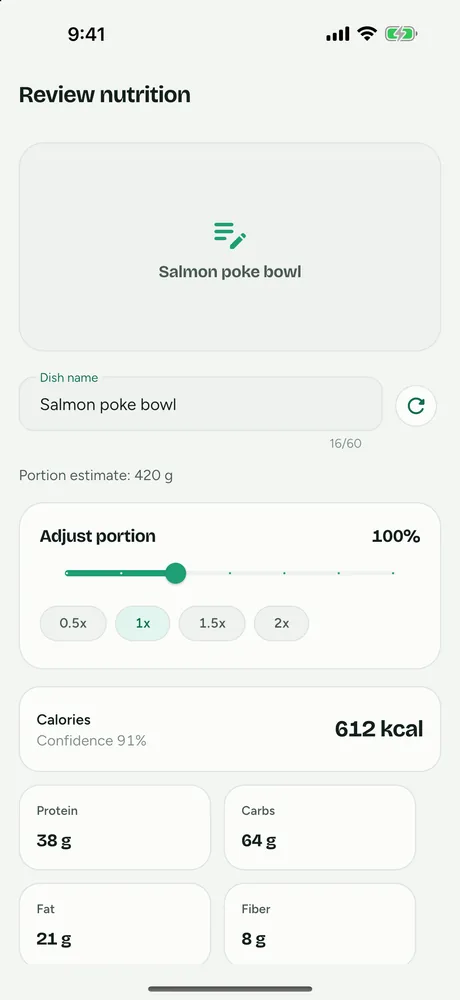
- Dish name. If the AI called your chicken curry "beef stew", fix the name. Premium users can tap recalculate to re-run the estimate from the corrected name.
- Portion. Compare the portion estimate with what you actually ate, then use the slider (0.5× to 2×) or the preset chips. Ate half? Choose 0.5×.
- The numbers. Tap any of the eight values (calories, protein, carbs, fat, fiber, sugars, sodium, saturated fat) to edit it. This is where you add the oil the camera could not see. If you raise fat, raise calories too; the app doesn't change one when you edit the other.
- Ingredients. You can add or remove ingredient chips to keep a better record, but editing them does not recalculate the numbers.
- Meal tag. Breakfast, Lunch, Dinner, Snack or Treat is picked from the time of day; change it if needed.
You can also edit an entry later from History. And if a meal is one you eat often, once you have a version you trust, re-adding it from History in one tap is free and skips the photo step entirely.
FitFoodie uses Google Gemini for its estimates. They are estimates for information, not lab measurements, and AI photo and text analysis are part of Premium. Barcode scanning, water and weight tracking are free. If you want to see the photo flow end to end, read about the AI calorie counter from a photo.
Frequently asked questions
What is the best angle for a food photo calorie app?
About 45 degrees works for most plates: it shows both what is on the plate and how tall it is. Shoot straight down for flat foods like pizza or toast, and from lower down for tall foods like burgers, sandwiches or drinks.
Should I take one photo of my whole meal or one per dish?
One photo per dish. FitFoodie analyzes a single photo per entry and returns one dish name and one set of totals, so separate photos give you separate entries you can check and correct one at a time.
Can a photo see the oil or butter in my food?
Often not. Fat cooked into food or soaked into rice and bread is hard to see in a picture. Leave sauces and dressings in view where you can, and if you know a dish was cooked in a lot of oil or butter, raise the fat and calorie numbers before saving.
Is a barcode scan better than a photo?
For packaged food, yes. A barcode pulls label data from a product database instead of estimating. FitFoodie's barcode scanner is free; if a photo happens to show a known product barcode, FitFoodie uses the label data instead of the AI estimate.