We make FitFoodie, so weigh our view accordingly. Lose It! suits you if you want a free calorie tracker with a weight plan and community, and are happy to pay for photo logging and barcode scanning. Cal AI suits you if you want a photo-first app with a 3-day trial and Apple Watch support. FitFoodie suits you if you want a free barcode scanner and an editable AI estimate; its photo and text AI are Premium.
What happened to Lose It!'s Snap It?
If you search for "Lose It Snap It," most results are launch coverage from years ago. The feature still exists, but the name doesn't. Lose It!'s current App Store listing (version 18.5.702, October 2026) calls it "Photo Meal Logging – Log meals by taking a picture." The AI identifies the foods, and you confirm the portions.
It's a Premium feature. The listing puts photo logging under "Premium plan features," together with AI Voice and the Barcode Scanner. The free plan covers calorie tracking, a weight plan and the community.
How does photo logging work in Lose It!, Cal AI and FitFoodie?
All three start from a photo, but they handle portions and corrections differently. If you're new to the idea, our explainer on how AI counts calories from a picture covers the basics.
Lose It!
Photo logging sits inside a full calorie tracker. The AI identifies the foods in your picture and you confirm the portions, per the App Store listing. Confirming portions yourself is a sensible design, since portion size is a big source of error in photo estimates.
Cal AI
Cal AI is photo-first. According to its website, it uses your phone's depth sensor to estimate portion volume. It also logs by barcode and by text description. It runs on iPhone (iOS 18+), Apple Watch, Vision Pro, Apple silicon Macs and Android. Since a deal announced in March 2026, it's owned by MyFitnessPal and still runs as a separate app.
FitFoodie
FitFoodie takes one photo per meal and returns one estimate for the whole dish, with a list of ingredient names. You then review it before saving.
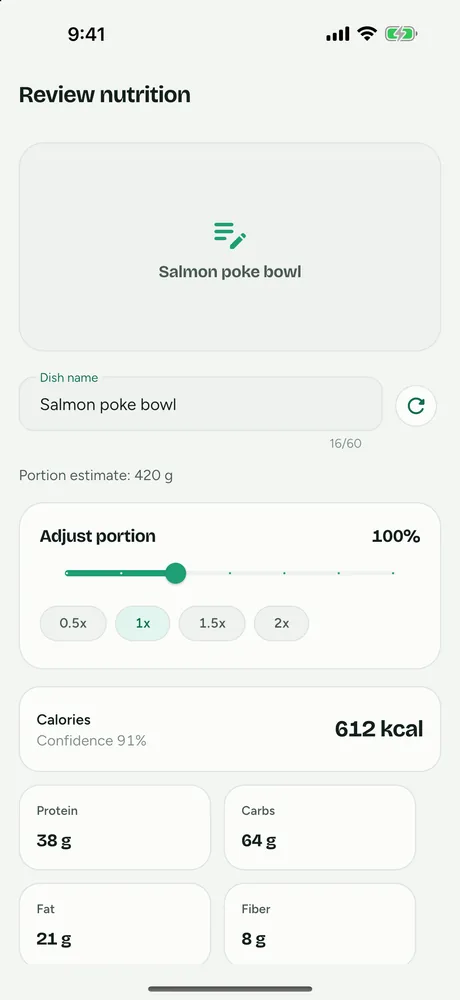
On that screen you can scale the portion from 0.5× to 2× and edit any of the eight values: calories, protein, carbs, fat, fiber, sugar, sodium and saturated fat. You can also rename the dish, edit ingredients and tag the meal. If the photo shows a product barcode the databases know, FitFoodie uses the label data instead of estimating. It also logs by typed description, and by barcode for free.
What's free and what's paid in each app?
| Feature | Lose It! | Cal AI | FitFoodie |
|---|---|---|---|
| Photo logging | Premium | Results need a subscription | Premium |
| Barcode scanning | Premium | Yes (tier not stated in our sources) | Free |
| Text description | Not confirmed | Yes | Yes, Premium |
| Voice | AI Voice, Premium | Not confirmed | No |
| Weight tracking | Weight plan, free | Not covered in our sources | Free, with 7-day trend and goal line |
| Community | Yes, free | Not covered in our sources | No |
| Free trial | Not covered in our sources | 3 days | 7 days on the yearly plan (new subscribers) |
| US prices on the App Store | In-app prices from $9.99 to $79.99, plus lifetime options at $49.99 and $59.99 (periods unlabeled) | In-app prices from $2.99 to $29.99 (periods unlabeled; paywall varies) | See the store listing |
| In the 2026 NIH test | Yes | Yes | No |
Last checked: October 2026. Sources: Lose It! on the App Store, calai.app, Cal AI on the App Store. App Store listings show in-app prices without saying which is monthly or yearly, so check the paywall before you subscribe.
Which is most accurate: Lose It!, Cal AI or FitFoodie?
Nobody can answer that with public data yet. The closest thing is a preliminary NIH study presented at NUTRITION 2026. It tested four photo apps (MyFitnessPal, Lose It!, Cal AI and Appediet) on 102 meal photos whose ingredients had been weighed.
- All four underestimated meals by roughly 250–345 calories and fat by about 30 g on average.
- Carbohydrate estimates were more consistent than fat and protein.
- MyFitnessPal and Lose It! were more accurate for higher-calorie meals than lower-calorie ones.
- Per-app numbers weren't released, and the findings haven't been peer-reviewed.
Cal AI's FAQ says it is "about 80% accurate," which is the company's own figure. FitFoodie wasn't in the study, publishes no accuracy number, and uses Google Gemini.
The practical takeaway is the same for all three: a photo estimate is a starting point. Check the portion, and add fat for oil, butter or dressing the camera can't see. If you're unsure whether photo logging suits you at all, read our comparison of photo logging vs manual logging.
How do you get better numbers from any photo logger?
Whichever app you choose, the same habits close most of the gap between a quick photo and what you actually ate.
- Get the whole plate in the frame. The AI can only estimate what it can see, so include sides, drinks and sauces.
- Check the portion before anything else. In Lose It! you confirm portions; in FitFoodie you set a multiplier from 0.5× to 2×. A wrong portion throws off every number at once.
- Account for hidden fat. The NIH researchers said the apps underestimate calories “especially from fats.” Cooking oil, butter and dressing rarely show in a photo, so raise fat and calories when you know they're there.
- Scan packaged food instead of photographing it. Label data is more reliable than a visual guess. In FitFoodie that's free; in Lose It! it's Premium.
- Log as you eat. It's easier to remember the extra spoon of sauce at the table than hours later.
Our guide to taking food photos for accurate calorie tracking goes further on angles, light and scale.
What does each app do best?
Lose It! gives you a lot for free if you're happy logging by hand: calorie tracking, a weight plan and a community. Asking you to confirm portions after the AI identifies foods is a good fit for people who want control.
Cal AI is the most device-flexible, with Apple Watch, Mac and Vision Pro support. It uses depth sensing for portions, and its 3-day trial lets you try photo scanning before paying.
FitFoodie keeps barcode scanning free; Lose It! puts it in Premium, and we couldn't confirm Cal AI's barcode tier. It tracks fiber, sugar, sodium and saturated fat on every entry, and lets you correct all eight values before saving. Weight and water tracking are free, and it runs on iOS 15+ and Android in five languages.
What doesn't FitFoodie do?
- Per-item nutrition. A plate gets one combined estimate, not one per food.
- Voice logging, a community, or a watch app.
- Apple Health, Google Fit or Health Connect sync.
- Food search by name or manual entry from scratch.
- Saved meals or recipes. You can re-add a past meal in one tap.
- A free trial on the monthly plan (the 7-day trial is yearly only).
- Unlimited AI. Premium is capped at 10 analyses a minute and 150 a day.
Who should pick Lose It!, Cal AI or FitFoodie?
- Pick Lose It! if you want a free tracker with a weight plan and community, and photo logging is a nice extra you'd pay for.
- Pick Cal AI if photos are how you want to log nearly everything, you'd like a trial first, and you use an Apple Watch or Mac.
- Pick FitFoodie if you scan packaged food often and want that free, want to see fiber, sugar, sodium and saturated fat, and prefer to correct each AI estimate before it's saved.
For deeper two-way comparisons, see our Cal AI alternatives page and our MyFitnessPal alternative with AI photo logging.
Frequently asked questions
Does Lose It! still have Snap It?
The feature is still there, but the name isn't. Lose It!'s current App Store listing calls it Photo Meal Logging and lists it under Premium plan features.
Is Lose It!'s barcode scanner free?
Not according to its current App Store listing (October 2026), which lists the Barcode Scanner under Premium plan features along with photo logging and AI Voice.
Which is more accurate, Lose It! or Cal AI?
There's no public answer. Both were in a preliminary NIH test presented in July 2026, which found the four apps tested underestimated meals by about 250 to 345 calories on average, but per-app results weren't released.
What's free in FitFoodie?
Barcode scanning, water tracking, weight tracking, history, reminders and the weekly view are free. AI photo and text analysis are part of Premium; the yearly plan starts with a 7-day free trial for new subscribers.