On Android, Cal AI is the most photo-centric pick, and SnapCalorie suits you if you want voice and text logging alongside photos (its LiDAR portion feature is iPhone-only). FitFoodie, which we make (weigh our view accordingly), fits if you want a free barcode scanner and free weight tracking on Android 7.0 or newer, with AI photo and text analysis in Premium.
Which AI calorie counters are on Android, and what is each best for?
Cal AI: best photo-first logger on Android
Cal AI is built around snapping a photo of your meal. Its official site lists photo scanning, barcode scanning and text descriptions, and its Android app is on Google Play. There is a 3-day free trial, but the App Store listing says scan results require a subscription; we didn't confirm Android pricing separately. On iPhone, App Store prices run from $2.99 to $29.99 with unlabeled billing periods, and the paywall varies (US, as of October 2026).
What to know: Cal AI's site says it uses the phone's depth sensor to estimate portion volume, and we couldn't confirm how that works across Android phones. Its Apple Watch, Mac and Vision Pro apps don't apply on Android. MyFitnessPal acquired Cal AI (announced March 2026, terms not disclosed), and it remains a separate app, per TechCrunch. In a preliminary NIH study presented at NUTRITION 2026, Cal AI was one of four apps that underestimated meals, by roughly 250–345 calories on average across the four. For a full comparison with our app, see our Cal AI alternative page.
SnapCalorie: best for voice and text logging alongside photos
SnapCalorie runs on iOS and Android. Besides photo analysis, it takes voice notes and text logs, which helps when a photo can't show what's in a dish. It was co-founded by Wade Norris, a co-founder of Google Lens, and raised a $2M seed round in 2023, per TechCrunch.
The Android caveat: SnapCalorie's best-known feature, LiDAR depth for portion size, is an iPhone Pro feature. Its App Store accuracy claims (about ±80 kcal on a 500-kcal dish with iPhone Pro, ±130 kcal on a regular iPhone) are the company's own and only cover iPhones. Pricing is mixed: snapcalorie.com says core features are free, while the App Store sells Premium from $9.99 to $149.00 (US, as of October 2026). We couldn't confirm a barcode scanner from official sources. More on our SnapCalorie alternative page.
FitFoodie: good fit for free barcode scanning and free weight tracking
FitFoodie is our app, available on Google Play. Our current build supports Android 7.0 (API 24) and newer; the Play listing shows the exact requirement for your device. You can log a meal three ways: snap a photo, scan a barcode, or describe it in a sentence. AI photo and text analysis, powered by Google Gemini, are part of Premium.
The free parts: the barcode scanner checks Open Food Facts, USDA FoodData Central and FatSecret in turn, and weight tracking shows a 7-day trend line, a goal line and milestones, in kg or lb. Water logging, meal reminders and the weekly view with days on target are free too. The app is in English, Spanish, German, French and Arabic, with a right-to-left layout for Arabic.
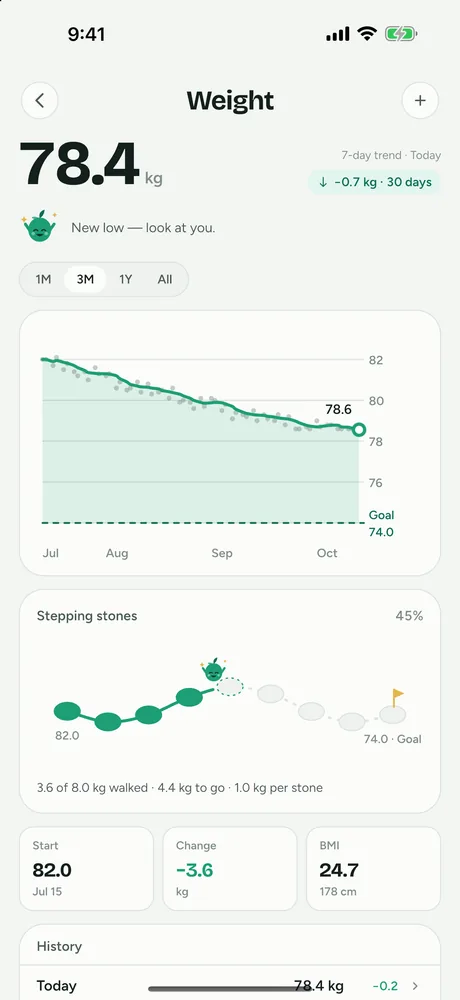
Where it falls short: FitFoodie has no Health Connect or Google Fit sync and no Wear OS app. It has no food search by name and no manual entry from scratch. The AI returns one set of totals per dish, not per item, and editing the ingredient list doesn't recalculate the numbers. You adjust the portion (0.5× to 2×) or edit any of the 8 values before saving. It hasn't been independently tested for accuracy. To see how photo logging works in the app, read about our AI photo calorie counter for Android and iPhone.
How do they compare on Android?
Last checked: October 2026. Prices are US, as of October 2026, and come from the App Store listings linked above; Google Play prices may differ.
| Cal AI | SnapCalorie | FitFoodie (ours) | |
|---|---|---|---|
| On Google Play | Yes | Yes | Yes |
| AI photo logging | Yes (subscription) | Yes | Yes (Premium) |
| Text or voice logging | Text | Voice notes and text | Text (Premium) |
| Barcode scanning | Yes | Not verified | Yes, free |
| Depth-based portions | Depth sensor per its site; Android support not confirmed | LiDAR on iPhone Pro only | No; manual 0.5–2× slider |
| Weight tracking | Not verified | Not verified | Yes, free |
| Free access | 3-day trial | Free core tier per its site; Premium sold | Free download; barcode, water and weight free; 7-day trial on yearly plan |
What changes when an AI calorie app runs on Android?
Five things are worth checking before you subscribe.
- Hardware-dependent features. Depth-based portion estimates rely on specific sensors. SnapCalorie ties its LiDAR feature to iPhone Pro models. If an app's marketing leans on depth sensing, check whether it says anything about Android.
- Ecosystem extras. Watch apps and desktop versions are often Apple-only. Cal AI's Apple Watch, Mac and Vision Pro apps are examples. If you want your data in Health Connect, confirm sync in the Play listing; FitFoodie doesn't offer it.
- Older phones. Each Play listing states the minimum Android version. FitFoodie's current build supports Android 7.0 and newer; check the others on your device's Play listing before you pay.
- Connection needs. AI analysis runs on the developer's servers. In FitFoodie, AI analysis and barcode lookups need a connection, while water and saved entries queue offline and sync later. If you often eat where signal is poor, check how your app handles that.
- Pricing and trials. Store prices and trial offers can differ between Google Play and the App Store, and some apps test different paywalls. Check the price shown on your own device before you start a trial.
Whatever phone you use, the meal itself matters. The NIH test found that all four apps it checked underestimated calories, especially from fat (as the researchers put it). Whatever you choose on Android, make sure you can correct an estimate before saving it. Our most accurate AI calorie trackers breakdown explains what the evidence does and doesn't show, and our food photo nutrition tracking guide covers how to get better results from any app.
Why aren't MyFitnessPal, Lose It!, Cronometer or MacroFactor listed?
All four are on Android, but we couldn't confirm from primary sources that their AI photo features work the same on Android as on iPhone, so we kept them off this list. Our roundup of the best AI calorie tracker apps of 2026 covers each in more detail. Briefly:
- MyFitnessPal: Meal Scan, barcode scan and voice log are all Premium ($19.99/mo or $79.99/yr, US, as of October 2026, per its App Store listing; its February 2026 Winter Release announcement lists Premium at $79.99/yr and Premium+ at $99.99/yr).
- Lose It!: photo logging and the barcode scanner are Premium, per its App Store listing.
- Cronometer: Photo Logging is a Gold feature.
- MacroFactor: photo, photo plus text, and text logging, per its help center; subscription only.
How did we pick these apps?
We included only AI calorie apps whose Android availability we confirmed from a primary source in October 2026: a Google Play listing or the developer's own platform list. We compared public information from store listings, official websites and published research. We didn't test the apps hands-on in a lab or weigh meals, and we don't rank them by accuracy, because no independent per-app accuracy data exists. Anything we couldn't confirm is marked "not verified".
We make FitFoodie, and we've tried to describe it by the same standard as the others, including what it lacks. Nutrition values from any of these apps are estimates for information, not medical advice.
Frequently asked questions
Is Cal AI available on Android?
Yes. Cal AI is on Google Play, published by Cal AI, Inc. Its Apple Watch, Mac and Vision Pro versions are Apple-only.
Does SnapCalorie's LiDAR portion feature work on Android?
SnapCalorie's depth-based portion estimate uses the LiDAR sensor on iPhone Pro models. SnapCalorie is available on Android, but the accuracy figures it states are for iPhone Pro and regular iPhones; we found none for Android phones.
Is there a free AI calorie counter for Android?
Most AI photo analysis is paid. Cal AI's listing says scan results require a subscription, and FitFoodie's photo and text analysis are Premium. SnapCalorie says its core features are free but also sells Premium. FitFoodie's barcode scanner, water and weight tracking are free.
Does FitFoodie sync with Health Connect or Google Fit?
No. FitFoodie has no Health Connect, Google Fit or wearable sync. Weight and meals are tracked inside the app.