Pick by need. Cal AI is the most photo-centric. MyFitnessPal suits people who want photo, barcode and voice logging in one established app and will pay $79.99/yr (US, as of October 2026). SnapCalorie uses iPhone Pro depth sensing for portions. FitFoodie, which we make (weigh our view accordingly), fits if you want a free barcode scanner and free weight tracking, with AI photo logging in Premium.
Which AI calorie tracker fits which need?
- Best photo-first logger: Cal AI. Photo scanning is the core of the app, with barcode and text logging alongside.
- Best if you want everything in one established app: MyFitnessPal Premium. Meal Scan, barcode scan and voice logging, all behind the Premium plan.
- Best for depth-based portion estimates on iPhone Pro: SnapCalorie. It uses LiDAR to estimate portion size.
- Best for the most ways to feed the AI: MacroFactor. Photo, photo plus text, uploaded images, text descriptions and AI label scanning.
- Best for a free weight plan, with photo logging in Premium: Lose It!
- Good fit for free barcode scanning plus free weight tracking: FitFoodie (our app). AI photo and text analysis are Premium.
- Worth knowing if you already use it: Cronometer added Photo Logging for Gold subscribers in 2025.
None of these picks is based on accuracy. No independent test has ranked these apps against each other on calories, which we explain in our most accurate AI calorie tracker breakdown. For how photo tracking works end to end, see our AI photo calorie tracking guide.
How do the apps compare side by side?
Last checked: October 2026. Prices are US, as of October 2026, from the linked listings or official pages. "Not verified" means we couldn't confirm it from a primary source.
| App | AI photo logging | Barcode scanning | Other AI input | Price (US, Oct 2026) |
|---|---|---|---|---|
| MyFitnessPal | Meal Scan, Premium | Premium (since 2022) | Voice log (Premium) | $19.99/mo or $79.99/yr; Premium+ $99.99/yr |
| Cal AI | Core feature; uses depth sensor | Yes | Text description | Varies by paywall; App Store prices $2.99–$29.99, periods unlabeled |
| Lose It! | Photo logging, Premium | Premium | AI Voice (Premium) | Often reported ~$39.99/yr; App Store $9.99–$79.99, periods unlabeled |
| SnapCalorie | Core feature; LiDAR on iPhone Pro | Not verified | Voice notes, text | Free core tier plus Premium (App Store $9.99–$149.00) |
| MacroFactor | Photo, photo + text, upload | Yes, plus AI label scan | "Describe" text logging | Subscription only; price not verified |
| Cronometer | Photo Logging, Gold only | Yes | Not verified | Gold subscription; price not verified |
| FitFoodie (ours) | Premium; one photo per meal | Free | Text description (Premium) | Free download; we don't list Premium prices here, check the store |
What does each app do well, and where does it fall short?
Cal AI: best photo-first logger
Cal AI is built around the camera. Its official site lists photo scanning, barcode scanning and text logging, and says it uses the phone's depth sensor to estimate portion volume. It runs on iPhone, Apple Watch, Mac and Vision Pro, and on Android via Google Play. There is a 3-day free trial, but the App Store listing says food scanning results require a subscription.
Two things to know. MyFitnessPal acquired Cal AI (announced March 2026, terms not disclosed), and the app stays separate, per TechCrunch. Cal AI was also briefly pulled from the App Store in April 2026 over billing and in-app-purchase violations, then reinstated. Its FAQ says it is "about 80% accurate"; that is a company claim, and Cal AI was one of the four apps that underestimated meals in the preliminary NIH test described below. We compare it with our app in detail on our Cal AI alternative page.
MyFitnessPal: best if you want everything in one established app
MyFitnessPal's AI photo feature is called Meal Scan. Its February 2026 Winter Release announcement puts Meal Scan, Barcode Scan and Voice Log in Premium and lists Premium at $79.99/year and Premium+ at $99.99/year. As of October 2026 in the US, its App Store listing shows Premium at $19.99 a month or $79.99 a year. The barcode scanner has required Premium since October 2022.
The strongest independent point in its favor: in a 2024 study in Nutrients of seven AI image apps, MyFitnessPal was best at identifying the foods in a photo (97%). The same study found automatic energy estimates from photo apps inaccurate overall, so recognizing a dish is not the same as counting it correctly. The downside is cost: every AI and scanning feature is paid.
SnapCalorie: best for depth-based portions on iPhone Pro
SnapCalorie was co-founded by Wade Norris, a co-founder of Google Lens. On iPhone Pro models it uses LiDAR depth data to estimate portion size, and it also takes voice notes and text. Its App Store listing claims ±80 kcal on a 500-kcal dish with an iPhone Pro and ±130 kcal on a regular iPhone. Those figures are the company's own; the research behind them, Nutrition5k, is a peer-reviewed computer-vision paper, not an independent test of the app.
Pricing is unclear: snapcalorie.com says core features are free, while the App Store shows Premium purchases from $9.99 to $149.00. We could not confirm a barcode scanner from official sources.
MacroFactor: best for the most ways to feed the AI
MacroFactor's help center describes an AI tab with Photo, Photo & Text and Upload options, plus "Describe" for text-only logging, a barcode scanner and AI label scanning. Adding text to a photo is useful, because you can tell the AI about the oil or sauce the camera can't see. The catch: MacroFactor is subscription-only, so there is no free tier to try the basics, and we couldn't verify its current price from a primary source.
Lose It!: best for a free weight plan, with photo logging at a lower yearly price
Lose It!'s App Store listing keeps calorie tracking and a weight plan free, and puts photo meal logging (formerly called Snap It), AI Voice and the barcode scanner in Premium. Third-party reports commonly cite about $39.99/yr; the App Store listing shows in-app prices from $9.99 to $79.99 without billing periods. The AI identifies foods and you confirm portions. Like MyFitnessPal, it charges for barcode scanning. We compare it with Cal AI on our Lose It! vs Cal AI page.
FitFoodie: best for free barcode scanning plus free weight tracking
FitFoodie is our app. Its barcode scanner is free and checks Open Food Facts, USDA FoodData Central and FatSecret in turn. Weight tracking is free too, with a 7-day trend line, a goal line and milestones. AI photo and text analysis, powered by Google Gemini, are part of Premium. If a photo shows a product barcode, FitFoodie uses the label data instead of guessing. It's available in English, Spanish, German, French and Arabic, and AI results come back in your language.
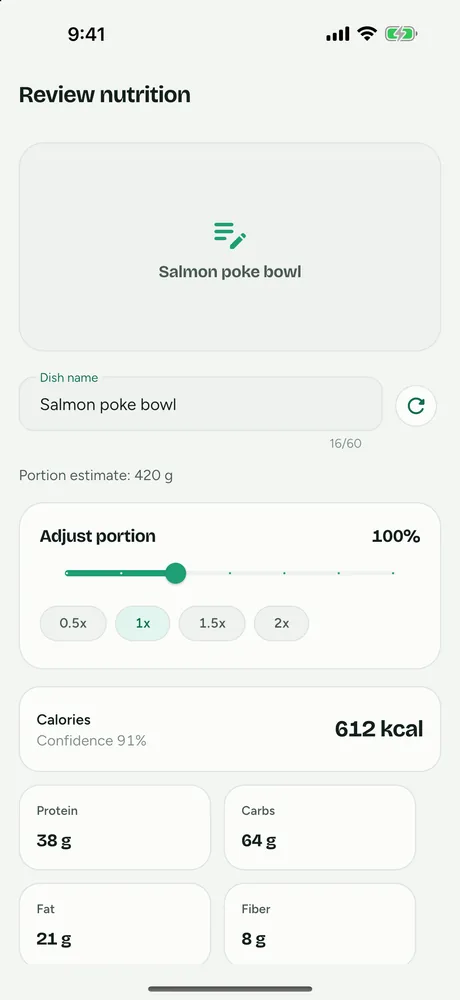
Where others do better: FitFoodie has no food-database search by name and no way to enter a food from scratch, so if you like typing "oatmeal" and picking from a list, it isn't for you. MyFitnessPal and Lose It! also offer voice logging (Premium in both), which FitFoodie doesn't. It has no Apple Health or Health Connect sync and no watch app, while Cal AI runs on Apple Watch. Its AI returns one set of totals per dish, not per item, and editing the ingredient list does not recalculate the numbers. You adjust the portion (0.5× to 2×) or edit any of the 8 values yourself. It has not been independently tested for accuracy.
Cronometer: worth knowing if you already use it
Cronometer launched Photo Logging in beta in June 2025 and released it generally in August 2025. Per its support page, it is a Gold feature. If you already pay for Gold, it is worth trying before switching apps. We couldn't verify the Gold price from a primary source.
How should you choose?
Ask three questions before you subscribe to anything:
- What do you mostly eat? If most of your food comes in packages, a barcode scanner gives you label data rather than an estimate. Check whether the app charges for it: MyFitnessPal and Lose It! do; FitFoodie doesn't.
- Can you fix the estimate? Photo apps tend to miss hidden fats. In a preliminary NIH study presented at NUTRITION 2026, MyFitnessPal, Lose It!, Cal AI and Appediet all underestimated meals by roughly 250–345 calories and about 30 g of fat on average. Pick an app that lets you change the portion and the numbers, or add a text note. Our guide to why photo apps underestimate explains where the gap comes from.
- Which phone and which extras? SnapCalorie's LiDAR portion estimates need an iPhone Pro. Apple Watch support, health-app sync and food-database search vary by app. If you're on Android, see our best AI calorie counter for Android list, which only includes apps we confirmed on Google Play.
Most of these apps offer a free download or trial, so try the photo flow on a meal you know well, such as a packaged food where you can check the label, before paying for a year.
How did we compare these apps?
We compared public information only: App Store and Google Play listings, official websites, help-center pages, press releases and published research, all checked in October 2026. We did not run hands-on lab tests or weigh meals ourselves, and we don't score accuracy, because no independent per-app accuracy data exists. Where a fact came only from third-party sites or conflicting sources, we marked it "not verified" or left it out.
We chose the apps that show up most in this category and whose features we could confirm from primary sources. We left out apps whose details we could only find in their own marketing blogs. Prices change and some apps test different paywalls, so the price you see may differ. We make FitFoodie, and we've tried to describe it by the same standard as everyone else.
Nutrition values from any of these apps are estimates for information, not medical advice.
Frequently asked questions
What is the best app to take a picture of food and count calories?
For a photo-first app, Cal AI is built around the camera and adds barcode and text logging. If you already use MyFitnessPal, its Premium Meal Scan does the same inside a larger app. No app has been shown to be the most accurate in independent tests, so pick one that lets you edit the result.
Are AI calorie tracker apps free?
Mostly not for the AI part. MyFitnessPal's Meal Scan, Lose It!'s photo logging and Cronometer's Photo Logging are paid features, Cal AI's listing says scan results require a subscription, and FitFoodie's photo and text analysis are Premium. FitFoodie's barcode scanner, water and weight tracking are free.
Which AI calorie tracker is the most accurate?
No independent study has published a per-app ranking. A preliminary NIH study presented at NUTRITION 2026 found four photo apps all underestimated meals by roughly 250–345 calories on average, without releasing per-app numbers. See our accuracy breakdown.
Is FitFoodie the best AI calorie tracker?
We make FitFoodie, so we won't call it the best. It fits people who want free barcode scanning and free weight tracking, with AI photo and text logging in Premium. It has no food-database search, no voice logging, no Apple Health or Health Connect sync and no watch app; Cal AI, for example, runs on Apple Watch.